Building AI Agents - Do It Yourself (Part 2)
Agent frameworks, orchestration and a practical multi-agent research implementation.
The fundamental analyst only speaks when asked and forgets everything the moment you leave. The technical analyst draws beautiful charts but can't remember what ticker they were analyzing five minutes ago. The risk analyst calculates every metric but has no idea what the other two are working on. Sound familiar? Remember Lehman Brothers? Now imagine your only way to communicate with these analysts is through written notes that you have to carry between their separate offices. Fun, right? That's essentially what building AI agents without a framework feels like. You have to write all the code to prompt the LLM, parse its response, figure out what to do next, prompt the LLM again with carefully constructed context, handle errors when the API times out, track how many tokens you've used, and somehow maintain state across all these interactions. Before you know it, your "simple" stock analyzer has turned into a mess of API calls, string manipulation, and error handlers.
In Part 1, we explored what AI agents are and why they matter for financial applications. Now, let's see how specialized frameworks transform this chaos into elegant, maintainable systems -and build our first working financial AI agent.
Why Frameworks Transform Agent Development
When you strip away all the buzzwords, AI agents are fundamentally just a series of LLM calls where each subsequent call is influenced by the outputs of previous ones. The "intelligence" emerges from this orchestrated dialogue - but the orchestration itself? That's pure engineering complexity.
Think about what needs to happen in even a simple agent workflow:
Prompt an LLM with specific instructions and context
Parse the response to determine the next action
Possibly call some functions (or tools) based on that decision and what LLM’s output asked for
Gather the output and new data provided by these functions and call LLM again
Maintain context across multiple such interactions
Handle errors, retries, and rate limits
Track token usage for cost management
Potentially coordinate multiple LLMs working together
Decide when to stop
Present a coherent final output to the user
You could build all this from scratch but it is so much easier with a framework.
Core Abstractions That Matter
Modern agent frameworks provide several key abstractions that transform raw LLM API calls into manageable systems:
Agents: Consistent AI Personalities Instead of writing new prompts each time, frameworks let you create agents with fixed roles. Your "Financial Analyst" agent always focuses on fundamentals, while your "Risk Manager" agent evaluates risks. These roles stay consistent throughout.
Tools: Connecting Thoughts to Actions LLMs can decide what to do but can't actually fetch data or run calculations (as we discussed in Part 1). Tools are functions the framework gives to the LLM with instructions on how to use them. The LLM decides when to call them, while the framework handles the execution. It's like giving analysts access to data terminals - they choose what to look up, but the terminal does the work.
Context Management: Memory Across Conversations
Raw LLMs have no memory between calls. Frameworks solve this through various context management strategies - from simple conversation history to sophisticated variable systems that maintain state throughout complex workflows. AG2's ContextVariables, for instance, let agents share information seamlessly without each agent needing to process the entire conversation history.
Orchestration Patterns: From Chaos to Choreography
Importantly, frameworks provide battle-tested patterns for agent coordination. AG2 alone offers patterns ranging from simple pipelines where agents process tasks sequentially, to complex hierarchical structures where manager agents delegate to specialists, to redundant systems where multiple agents validate each other's work. These aren't just theoretical constructs - they map directly to real-world financial workflows.
Consider a few patterns particularly relevant to finance:
Pipeline Pattern: Perfect for data processing workflows like "fetch prices → calculate indicators → detect patterns → generate signals"
Hierarchical Pattern: Mirrors how investment firms actually work, with senior analysts coordinating specialists in different sectors or asset classes
Redundant Pattern: Critical for high-stakes decisions where you want multiple independent analyses before risking capital
Built-in Advantages You Don't Want to Rebuild
Frameworks also provide practical benefits that would be painful to implement yourself:
Error Handling That Actually Works
When an API call fails - and it will - frameworks provide sophisticated retry logic with exponential backoff. When an agent produces nonsense - and it occasionally will - frameworks can route to error-handling agents or gracefully degrade functionality. AG2 even lets you define specific error-handling agents that activate when things go wrong, keeping your workflow running smoothly.
Token Tracking and Cost Management
Every token costs money, and complex agent workflows can burn thousands of them quickly. Please note, frameworks track usage across all agents and calls, letting you set budgets, optimize prompts, and understand exactly where your API costs are going. When you're running thee portfolio analyzer every hour, the difference between $10 and $30 per run adds up fast.
Provider Abstraction and Model Mixing
Perhaps you want to use GPT-4 for complex analysis but Claude for nuanced writing, or you need to switch providers when one has an outage. Frameworks abstract away these details - change a configuration line and your entire system switches models. Even better, you can mix models within a single workflow, using cheaper models for simple tasks and premium ones only where needed or use a specialized in-house fine tuned model for some task.
Production-Ready Patterns
The frameworks we'll examine have been battle-tested on thousands of real-world projects. Their patterns encode solutions to problems you haven't even encountered yet - race conditions in multi-agent systems, context window management for long conversations, graceful handling of partial failures. Why rediscover these solutions the hard way?
Think of frameworks as the difference between building a trading system in assembly language versus Python with pandas and QuantLib. Could you build everything from scratch? Theoretically, yes. Would it be a good use of your time? Absolutely not. The interesting problems in AI agents aren't in the plumbing - they're in the design of agent behaviors, the quality of analysis, and the reliability of outputs. Frameworks handle the plumbing so you can focus on what matters.
Framework Landscape for Financial AI Agents
Now that we understand why frameworks are essential, let's examine the three leading options for building financial AI agents. Each represents a fundamentally different philosophy about how agents should be structured and orchestrated. Your choice will shape not just your initial development experience, but how your system evolves as requirements grow more complex.
1. CrewAI: The Opinionated Orchestra (link)
CrewAI was built around a compelling promise: what if building AI agents was as simple as describing a team of human specialists? Instead of wrestling with low-level orchestration logic, you define agents by their roles, goals, and backstories - then let them collaborate like a well-functioning team.
At its core, CrewAI is built on a role-playing metaphor where agents are given specific roles (e.g., "Financial Research Specialist"), goals (e.g., "Gather comprehensive information about a stock"), and backstories that guide their behavior. This isn't just cute naming - these elements directly influence how the agents approach problems and interact with each other.
The framework's primary strength lies in its opinionated, process-driven orchestration. A Crew object manages a workflow of Tasks assigned to specific Agents, with a default sequential process where one agent completes its task and passes the output to the next. For many financial workflows - like moving from data gathering to analysis to report generation - this maps perfectly to how human teams actually work.
Strengths:
Rapid Development: You can go from idea to working multi-agent system faster than with most other frameworks. The high-level abstractions mean less boilerplate code.
Intuitive Mental Model: If you can describe how a human team would tackle a problem, you can build it in CrewAI.
Built-in Best Practices: The framework guides you toward proven patterns for agent collaboration.
Tool Ecosystem: CrewAI can leverage LangChain's extensive tool library while maintaining its own crewai-tools repository and supporting the Model Context Protocol (MCP).
Limitations:
Flexibility Constraints: The high-level abstractions that make CrewAI so easy to start with can become restrictive when you need to implement non-standard, more complex workflows.
Memory Challenges: While CrewAI offers built-in memory with short-term (RAG-based), long-term (SQLite), and entity memory, community feedback suggests achieving sophisticated conversational memory can be challenging.
Less Mature Ecosystem: As a newer framework, it has fewer integrations and a smaller community compared to LangChain.
Licensing and Governance: CrewAI is licensed under the MIT License, one of the most permissive open-source licenses. The company CrewAI Inc. monetizes through a commercial platform that includes a UI Studio for no-code agent building, deployment tools, and performance tracking. They offer both cloud and self-hosted options for enterprise customers.
Best For: CrewAI shines when you need to quickly build systems for structured, repeatable tasks that map well to a team metaphor. Think automated financial reporting, standardized analysis workflows, or any scenario where you'd normally assign tasks to a team of analysts.
LangChain: The Swiss Army Knife (link)
LangChain is the elder statesman of agent frameworks, and it shows in both its maturity and complexity. Its core philosophy is one of modularity and composition - developers are provided with a vast set of building blocks that can be linked together into "chains". This unopinionated approach grants maximum flexibility at the cost of requiring more decisions from developers.
The framework's evolution tells an important story. The linear nature of chains proved insufficient for modeling complex, stateful agent interactions, leading to the development of LangGraph, which models workflows as explicit directed acyclic graphs (DAGs). In LangGraph, nodes represent agent actions or tool calls, while edges define the control flow between them - essentially turning your agent system into a formal state machine.
Strengths:
Maximum Control: Every aspect of agent behavior and orchestration is under your direct control.
Extensive Ecosystem: LangChain possesses the largest and most mature ecosystem of integrations, with comprehensive Document Loaders, API wrappers, and VectorStore integrations.
Production Tooling: LangSmith, their commercial observability platform, is arguably the most sophisticated debugging and monitoring solution in the space.
Community and Resources: With 110k GitHub stars and 915+ releases, you'll find examples, tutorials, and solutions for almost any use case.
Limitations:
Complexity Overhead: LangChain faces criticism for what some developers describe as a "painful" ecosystem with excessive layers of abstraction.
Steep Learning Curve: The flexibility comes at the cost of needing to understand many concepts and make numerous architectural decisions.
Verbose Code: Building even simple workflows can require significant boilerplate.
Licensing and Governance: LangChain is licensed under the MIT License. LangChain AI, the commercial entity, monetizes through LangSmith for observability and the LangGraph Platform for deployment, with options ranging from free developer tiers to enterprise plans with self-hosting capabilities.
Best For: LangChain/LangGraph is ideal when you need to build highly customized agents with complex, non-linear workflows. It's the framework of choice for teams building novel architectures or those who need granular control over every aspect of agent behavior.
AG2: The Community's Choice (link)
AG2 (formerly AutoGen) positions itself as an "open-source operating system for Agentic AI". Born from Microsoft Research and now maintained by an active community led by the developers of the original Autogen, it takes a unique approach: conversation between agents as the fundamental organizing principle for agent systems.
The framework's fundamental building block is the ConversableAgent, a flexible entity capable of sending, receiving, and replying to messages using LLMs, tools, or human input. But AG2's real innovation lies in its pre-built conversation patterns. Beyond simple sequential models, AG2 provides ready-to-use orchestrators for two-agent chats, GroupChat (where agents dynamically collaborate), and Nested Chats for modular, hierarchical task decomposition.
What was previously called the "Swarm" pattern has been integrated into the GroupChat functionality as of version 0.9, providing even more flexible orchestration options within a unified framework. This allows developers to model everything from simple pipelines to complex market simulations by selecting appropriate conversational patterns rather than building orchestration logic from scratch.
Strengths:
Flexible Conversation Patterns: Pre-built patterns for common multi-agent interactions save development time while remaining customizable.
Universal Interoperability: AG2 provides a dedicated interoperability layer allowing seamless use of tools from LangChain, CrewAI, and other frameworks - a "bring your own tools" philosophy.
Production Focus: Strong emphasis on structured outputs, human-in-the-loop workflows, and error handling makes it suitable for high-stakes applications.
Research Heritage: Benefits from Microsoft's research foundation while being community-driven and independent.
Limitations:
Smaller Community: With 2,9k+ GitHub stars, it has a smaller user base than the alternatives, though this includes significant inherited momentum from AutoGen.
Evolving Documentation: As a community fork still establishing its identity, documentation and examples are less comprehensive than LangChain's.
Learning Curve for Advanced Features: While basic usage is straightforward, leveraging advanced conversation patterns requires understanding the framework's unique approach.
Licensing and Governance: AG2 is licensed under the Apache 2.0 License, which includes an explicit grant of patent rights - often favored by enterprise legal teams. The commercial entity AG2.ai offers managed services and is building out AG2 Studio for visual prototyping, an AG2 Marketplace, and enterprise scaling tools.
Best For: AG2 excels when you need to simulate complex conversational dynamics, require strong interoperability between different tool ecosystems, or need production-ready features like structured outputs and human oversight. It's particularly well-suited for compliance workflows, market simulations, and applications where data integrity is paramount.
Comparison: Choosing Your Framework
The selection of a framework is not a matter of absolute superiority but a strategic decision based on project requirements and the fundamental trade-off between granular control and development speed.
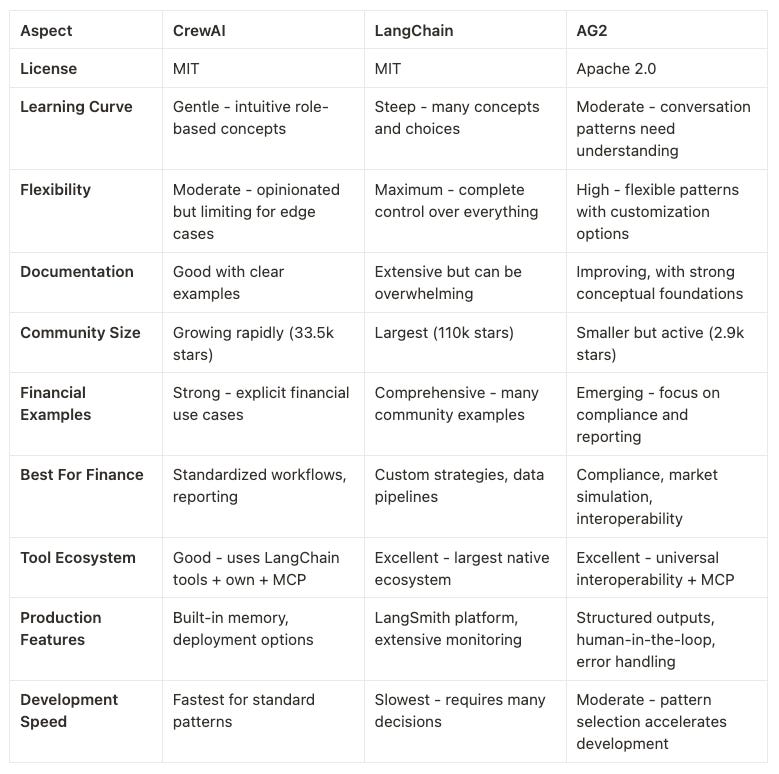
The convergence toward graph-based orchestration across all frameworks - LangGraph for LangChain, Flows for CrewAI, and integrated GroupChat patterns for AG2 - signals a market consensus that complex problems require sophisticated control flow. Your choice should align with your specific needs:
Choose CrewAI if you want to get a working system quickly and your use case fits well into a team-based mental model.
Choose LangChain if you need maximum flexibility and control, have complex requirements, or want access to the largest ecosystem.
Choose AG2 if you value interoperability, need production-ready features for high-stakes applications, or want to model complex conversational dynamics.
In practice, thanks to AG2's interoperability features, you might not need to choose just one. You could prototype rapidly in CrewAI, leverage LangChain's tools, and orchestrate everything through AG2's conversation patterns. The frameworks are evolving from competitors to complementary components in a larger ecosystem - which is exactly what a maturing market should do.
For our examples, we've chosen AG2 as it strikes the optimal balance between flexibility and complexity while avoiding vendor lock-in. Its Apache 2.0 license provides robust legal protection, and as a community-driven project, you're not tied to any particular company's roadmap, LLM provider, or cloud platform. This independence, combined with AG2's philosophy of universal tool interoperability, makes it an ideal choice for building financial AI systems that can evolve with your needs. Lastly, it is the framework we use internally for our agents here at QuantJourney.
Let's see how this translates into code by building our first, simple financial agent system using AG2.
Building Your First Financial Agent System with AG2
Let's transform theory into practice by building a working multi-agent system that analyzes stocks. This example demonstrates AG2's core concepts without getting bogged down in external dependencies - we'll use mock data for now and add real tools in Part 3.
Setting Up Your Environment
First, let's install the necessary dependencies. AG2 is distributed as the autogen package (a legacy of its AutoGen heritage):
pip install "ag2[openai]" python-dotenv
Create a .env file in your project directory with your OpenAI API key:
# Get your API key from: <https://platform.openai.com/account/api-keys>

OPENAI_API_KEY=your_openai_api_key_here
# Model Configuration
DEFAULT_MODEL=gpt-4o-mini
MAX_TOKENS=1000
TEMPERATURE=0.7

# Debug Configuration
VERBOSE_OUTPUT=True
Two key parameters control your LLM's behavior:
MAX_TOKENS: The maximum length of the response. Higher values allow more detailed analyses but cost more and take longer. Typically up to 4096, although newer models can generate much more tokens (OpenAI model comparison).
TEMPERATURE (0.0-2.0): Controls response creativity. Lower values (0.0-0.5) produce focused, more deterministic output. Higher values (0.7-1.0) add variety but may reduce consistency.
These will be read by our code from the .env file and then passed on to the LLMs when we will call them via the framework.
Understanding the Architecture
Our stock analysis system consists of four specialized agents working in sequence:
Data Analyst Agent - Analyzes price data and calculates metrics
News Analyst Agent - Evaluates news sentiment
Risk Assessment Agent - Assesses market risk factors
Coordinator Agent - Synthesizes findings into a final report
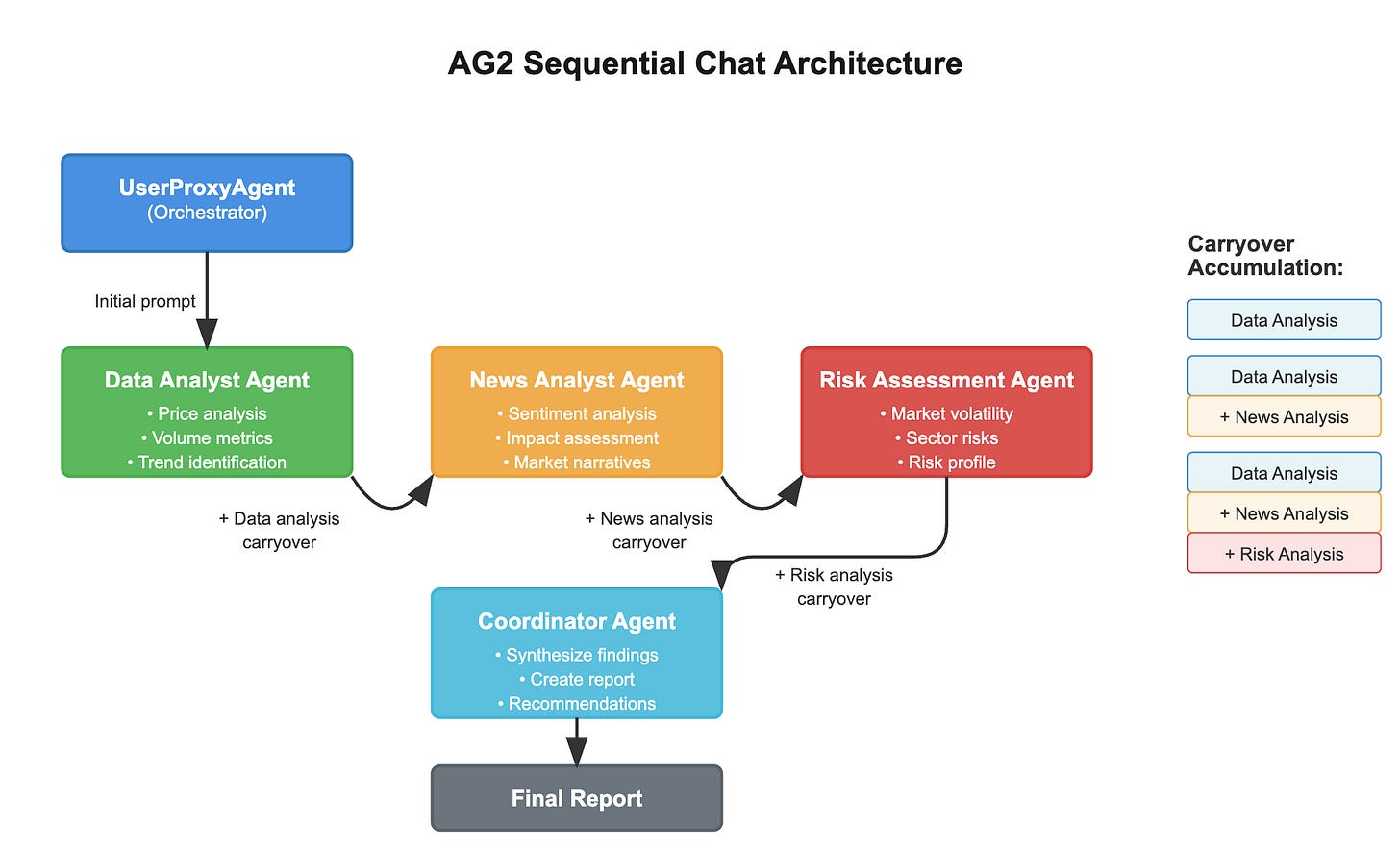
This sequential pattern mirrors how a real investment team might work: the data analyst crunches numbers, the news analyst gauges market sentiment, the risk analyst evaluates dangers, and a senior analyst pulls it all together. Each agent builds upon the work of previous agents, creating a comprehensive analysis through collaborative intelligence.
The System Foundation
Let's start with the main orchestrator class that manages our multi-agent system:
import os
import sys
from typing import Dict, Any
import logging
from autogen import ConversableAgent, LLMConfig, UserProxyAgent
from dotenv import load_dotenv

class StockAnalysisSystem:
	"""
	Main orchestrator for the multi-agent stock analysis system.
	"""

	def __init__(self):
	 	"""Initialize the stock analysis system with environment configuration."""
		load_dotenv()

		# Load configuration
		self.verbose = os.getenv('VERBOSE_OUTPUT', 'True').lower() == 'true'
		self.max_tokens = int(os.getenv('MAX_TOKENS', '1000'))
		self.temperature = float(os.getenv('TEMPERATURE', '0.7'))

		# Validate API key
		self.api_key = os.getenv('OPENAI_API_KEY')
		if not self.api_key or self.api_key == 'your_openai_api_key_here':
			print("Error: Please set OPENAI_API_KEY in your .env file")
			sys.exit(1)

		# Configure LLM for all agents
		self.llm_config = self._setup_llm_config()

		# Initialize agents
		self.agents = self._create_agents()

		# Generate realistic mock data
		self.mock_data = self._generate_mock_data()
This foundation demonstrates several AG2 principles:
Centralized LLM configuration shared across all agents
Environment-based configuration for flexibility
Clear separation between orchestration logic and agent definitions
You can notice that in the constructor we already call some methods that initialize the LLM configuration and the agents. Let's explain what happens there.
Configuring the Language Model
AG2's LLMConfig pattern standardizes how agents access language models. This abstraction means you can switch between providers (OpenAI, Anthropic, local models) by changing configuration, not code:
def _setup_llm_config(self) -> LLMConfig:
	"""
	Configure the Language Model for all agents.
	"""
		config = LLMConfig(
			model=self.model,
			api_key=self.api_key,
			max_tokens=self.max_tokens,
			temperature=self.temperature
		)
		return config
The beauty of this pattern is that all agents automatically inherit these settings, ensuring consistent behavior across your system while allowing for agent-specific overrides when needed. Switching to a different provider like DeepSeek requires minimal changes:
config = LLMConfig(
		model=self.model,
		api_key=self.api_key,
		base_url="<https://api.deepseek.com/v1>",
		api_type="deepseek",
		max_tokens=self.max_tokens,
		temperature=self.temperature,
		tags=["deepseek", "cost-effective"
)
For some providers it might require installing an additional module (eg. here is how to do this if you want to use Anthropic’s models), but still - it is fairly easy.
Creating Specialized Agents
Now comes the heart of AG2 - defining agents with specific roles and capabilities. AG2 uses the modern context manager pattern for agent creation:
def _create_agents(self) -> Dict[str, ConversableAgent]:
	"""Create and configure the four specialized agents."""
	agents = {}

	# Use the modern AG2 pattern with LLMConfig as context manager
	with self.llm_config:
		# Data Analyst Agent
			agents['data_analyst'] = ConversableAgent(
			name="data_analyst",
			system_message="""You are a Data Analyst Agent specializing in quantitative stock analysis.
			Your role is to:
						1. Analyze price data and calculate key metrics
						2. Identify trends and patterns in stock performance
						3. Provide clear, data-driven insights
						4. Present findings in an organized, educational format
						Focus on metrics like:
						- Price changes (daily, weekly, monthly)
						- Volume analysis
						- Volatility assessment
						- Performance relative to historical ranges
						Always explain your calculations and reasoning to help readers
						understand the analytical process.""", human_input_mode="NEVER"
)
Each agent receives a (hopefully carefully crafted) system_message that defines its expertise and approach. The human_input_mode="NEVER" setting indicates these agents operate autonomously without human intervention during execution - without this agents might stop and ask the user for an additional input from the console.
Let's look at the News Analyst Agent to see how different roles require different prompts:
agents['news_analyst'] = ConversableAgent(
	name="news_analyst",
	system_message="""You are a News Analyst Agent specializing in financial news sentiment analysis.
		Your role is to:
			1. Analyze news headlines and content for market sentiment
			2. Assess potential impact of news on stock performance
			3. Identify key themes and market narratives
			4. Provide sentiment scoring and impact assessment

			Focus on:
			- Overall sentiment (positive, negative, neutral)
			- Impact assessment (high, medium, low)
			- Key themes and catalysts
			- Market narrative analysis

			Present your findings clearly and explain how news sentiment
			typically affects stock performance.""",
			human_input_mode="NEVER"
)
The Risk Assessment Agent adds another perspective:
agents['risk_analyst'] = ConversableAgent(
	name="risk_analyst",
	system_message="""You are a Risk Assessment Agent specializing in market risk evaluation.
		Your role is to:
		1. Evaluate various risk factors affecting the stock
		2. Assess market conditions and volatility
		3. Identify potential threats and opportunities
		4. Provide risk-adjusted perspective on the investment

		Focus on:
		- Market volatility and stability
		- Sector-specific risks
		- Economic environment impact
		- Technical risk indicators
		- Overall risk profile assessment

		Provide balanced analysis that helps investors understand
		both potential rewards and risks.""",
		human_input_mode="NEVER"
)
Finally, the Coordinator Agent synthesizes everything:
agents['coordinator'] = ConversableAgent(
	name="coordinator",
	system_message="""You are the Coordinator Agent responsible for synthesizing analysis from all specialists.
		Your role is to:
		1. Integrate findings from Data Analyst, News Analyst, and Risk Analyst
		2. Create a comprehensive, coherent final report
		3. Highlight key insights and recommendations
		4. Present information in a clear, actionable format

		Your final report should include:
		- Executive summary of key findings
		- Data analysis highlights
		- News sentiment impact
		- Risk assessment summary
		- Overall outlook and considerations

		Structure your response to be informative for both novice and
		experienced investors. Format your response in markdown.

		Follow this format:
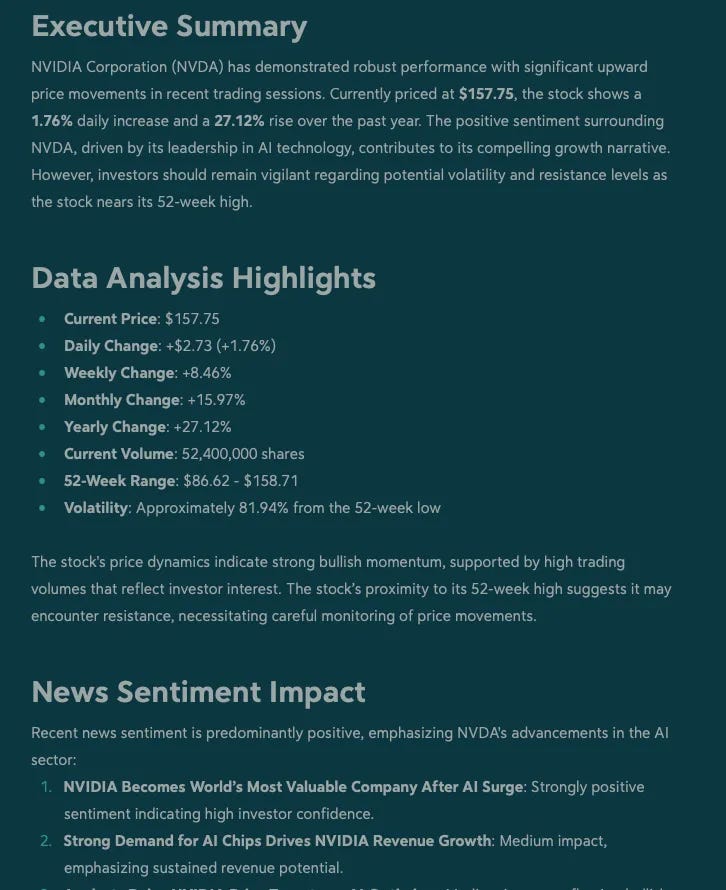
		# Executive Summary
		# Data Analysis Highlights
		# News Sentiment Impact
		# Risk Assessment Summary
		# Recommendations""",
		human_input_mode="NEVER"
)
Notice how each agent's prompt clearly defines its role, focus areas, and expected output format. This clarity is crucial for reliable agent behavior. Much of the work when building and running an agentic system is spent not in the code, but adjusting and tweaking these prompts.
In this example we follow the chat principle - the models respond with text and this is how they “talk” to one another. It is also possible, however, to ask models to return a structured format like JSON.
Mock Data Generation
For this educational example, we need to generate realistic mock data (in Part 3, we'll replace this with real market data through tools) so that our agents actually run:
def _generate_mock_data(self) -> Dict[str, Any]:
	"""Generate realistic mock data based on current NVDA market conditions."""

	mock_data = {
			'stock_data': {
				'ticker': 'NVDA',
				'current_price': 157.75,
				'previous_close': 155.02,
				'day_change': 2.73,
				'day_change_percent': 1.76,
				'week_change_percent': 8.46,
				'month_change_percent': 15.97,
				'volume': 52_400_000,
				'market_cap': 3.85e12,  # $3.85 trillion
				# ... more data
			},
			'news_data': [
				{
					'headline': 'NVIDIA Becomes World\\'s Most Valuable Company After AI Surge',
					'sentiment': 'positive',
					'impact': 'high',
					'summary': 'NVDA surpassed Microsoft to become the most valuable company globally.'
				},
				# ... more news items
			],
			'market_conditions': {
					'overall_market': 'bullish',
					'sector_performance': 'technology_leading',
					'volatility_index': 15.2,
					'ai_sector_sentiment': 'very_positive',
					'economic_indicators': 'stable'
				}
	}

return mock_data
Sequential Chat Orchestration
Here's where AG2's orchestration patterns truly shine. AG2's sequential chat pattern chains together multiple two-agent conversations, with each chat's summary automatically becoming carryover context for the next. This is much easier for the programmer than having to manually pass context between agents.
def analyze_stock(self, ticker: str = "NVDA") -> str:
	"""
		Orchestrate the multi-agent stock analysis using AG2's proper sequential chat pattern.
		This method demonstrates AG2's initiate_chats() method where:
			1. Each chat's summary becomes carryover for the next
			2. Framework handles the sequential orchestration
			3. Agents automatically build upon previous analysis
	"""

	# Prepare initial analysis prompt with mock data
	initial_prompt = self._prepare_analysis_prompt(ticker)

	# Create a coordinator user proxy to orchestrate the sequential chat
	user_proxy = UserProxyAgent(
		name="analysis_coordinator",
		human_input_mode="NEVER",
		code_execution_config=False,
		max_consecutive_auto_reply=0,
		system_message="You are coordinating a stock analysis workflow."
	)

	# Configure sequential chat workflow using AG2
chat_results = None
with self.llm_config:
	if self.verbose:
		print("\\nInitiating AG2 sequential chat workflow...")
		chat_results = user_proxy.initiate_chats([
			# Step 1: Data Analysis
			{
				"recipient": self.agents['data_analyst'],
				"message": initial_prompt,
				"max_turns": 1,
				"summary_method": "last_msg",
				"summary_prompt": "Summarize the key data analysis findings."
			},
			# Step 2: News Sentiment Analysis (with carryover from data analysis)
			{
				"recipient": self.agents['news_analyst'],
				"message": f"Now analyze the news sentiment for {ticker}. Consider the previous data analysis.\\n\\nNews data:\\n{self._format_news_data()}",
				"max_turns": 1,
				"summary_method": "last_msg",
				"summary_prompt": "Summarize the key news sentiment findings."
			},
			# Step 3: Risk Assessment (with carryover from both previous analyses)
			{
				"recipient": self.agents['risk_analyst'],
				"message": f"Evaluate risk factors for {ticker}. Consider the previous data and news analysis.\\n\\nMarket conditions:\\n{self._format_market_conditions()}",
				"max_turns": 1,
				"summary_method": "last_msg",
				"summary_prompt": "Summarize the key risk assessment findings."
			},
			# Step 4: Final Synthesis (with carryover from all previous analyses)
			{
				"recipient": self.agents['coordinator'],
				"message": f"Create a comprehensive final analysis report for {ticker}, synthesizing all previous specialist findings.",
				"max_turns": 1,
				"summary_method": "last_msg"
			}
		])

# Extract final report
final_report = "Analysis completed successfully."
if chat_results and chat_results[-1].summary:
	final_report = chat_results[-1].summary
	return final_report
This orchestration showcases AG2's sophisticated sequential chat pattern:
Automatic carryover: Each chat's summary automatically becomes context for subsequent chats, accumulating knowledge as the workflow progresses
Configurable interactions: Each chat can have different max_turns settings - use 1 for simple analysis, more for iterative refinement
Summary control: The summary_method and optional summary_prompt let you control what information flows forward
Clean abstractions: The framework handles all the complexity of maintaining context and orchestrating conversations
The UserProxyAgent serves as our workflow coordinator, initiating the sequential chats with our specialized agents. Unlike manual orchestration where you'd need to extract responses and pass them between agents, AG2's initiate_chats() method handles this automatically through its carryover mechanism.
You may have noticed that we use _prepare_analysis_prompt(ticker) to format our initial prompt as well as _format_news_data() to prepare the mock news for our news analyst. Below is the code for both methods.
def _prepare_analysis_prompt(self, ticker: str) -> str:
	"""Prepare the initial analysis prompt with mock data."""
	stock_data = self.mock_data['stock_data']
	prompt = f"""Please analyze {ticker} stock with the following current data:

			STOCK DATA:
			- Current Price: ${stock_data['current_price']:.2f}
			- Previous Close: ${stock_data['previous_close']:.2f}
			- Day Change: ${stock_data['day_change']:.2f} ({stock_data['day_change_percent']:.2f}%)
			- Week Change: {stock_data['week_change_percent']:.2f}%
			- Month Change: {stock_data['month_change_percent']:.2f}%
			- Year Change: {stock_data['year_change_percent']:.2f}%
			- Volume: {stock_data['volume']:,}
			- Market Cap: ${stock_data['market_cap']:.2e}
			- 52-Week Range: ${stock_data['week_52_low']:.2f} - ${stock_data['week_52_high']:.2f}

			Please provide your specialized analysis based on this data."""

	return prompt

def _format_news_data(self) -> str:
	"""Format mock news data for agent analysis."""
	news_items = []
	for item in self.mock_data['news_data']:
		news_items.append(f"• {item['headline']}")
		news_items.append(f"  Summary: {item['summary']}")
		news_items.append(f"  Sentiment: {item['sentiment']}, Impact: {item['impact']}")
		news_items.append("")
	return "\\n".join(news_items)

def _format_market_conditions(self) -> str:
	"""Format mock market conditions for agent analysis."""
	conditions = self.mock_data['market_conditions']
	formatted = f"""MARKET CONDITIONS:

		- Overall Market: {conditions['overall_market']}
		- Sector Performance: {conditions['sector_performance']}
		- Volatility Index: {conditions['volatility_index']}
		- AI Sector Sentiment: {conditions['ai_sector_sentiment']}
		- Economic Indicators: {conditions['economic_indicators']}"""

	return formatted
Please notice how the initial prompt is enriched with actual (in our case - mock) data. This is how it is usually done - since we know any analysis of such kind must include current price and basic indicators it makes sense to just fetch them programmatically and not waste tokens on having the LLM to reflect that it does not have this data and has to request it with a tool.
Also this is the place where we would put any prior context - if for example we have some prior history of analyses we might share our last summary here to give our agents additional information.
Putting It All Together
The main execution function ties everything together:
def main():
	"""Main execution function demonstrating the complete stock analysis workflow."""
	print("🚀 AG2 Stock Analysis Agent System - Part 2")
	print("Educational Multi-Agent Implementation")
	print("=" * 60)

	try:
		# Initialize the stock analysis system
		print("Initializing multi-agent system...")

		analysis_system = StockAnalysisSystem()
		# Run stock analysis for NVDA
		print(f"\\nAnalyzing NVDA using {len(analysis_system.agents)} specialized agents...")

		# Execute the multi-agent analysis
		final_report = analysis_system.analyze_stock("NVDA")
		# Display final results
		print("\\n" + "=" * 60)
		print("FINAL ANALYSIS REPORT")
		print("=" * 60)
		print(final_report)
		print("\\n" + "=" * 60)
		print("Analysis complete! This demonstrates AG2's sequential chat orchestration.")

	except KeyboardInterrupt:
		print("\\nAnalysis interrupted by user.")
	except Exception as e:
		print(f"\\nError during analysis: {e}")
	logger.error(f"Main execution error: {e}", exc_info=True)

if __name__ == "__main__":
	main()
Running Your First Multi-Agent System
Save the complete code as agent_2_simple.py, ensure your .env file contains your OpenAI API key, and run:
python agent_2_simple.py
You'll see each agent contribute its specialized analysis, building toward a comprehensive investment report. The verbose output shows exactly how agents communicate and build upon each other's work.
Key Takeaways
This example demonstrates several crucial AG2 concepts:
Agent Specialization - Each agent has a clear role defined by its system message
Sequential Chat Pattern - AG2's initiate_chats() method elegantly handles multi-step workflows with automatic context carryover
Context Management - Information flows naturally between agents through AG2's built-in carryover mechanism
Flexible Architecture - The same pattern works whether using mock data or real APIs
The sequential chat pattern is particularly powerful because:
The framework handles all context passing automatically
Each chat can have different interaction patterns (single response vs. multi-turn dialogue)
Summaries can be customized to control what information flows forward
The entire workflow is defined declaratively in a single method call
Of course, AG2 also provides more complex patterns, such as GroupChat, which allows agents to engage without a predetermined order. This order can be decided by the agents themselves or through tools, allowing the whole system to adapt to changes in context. This flexibility enables the creation of highly effective agentic systems using AG2. However, for our current examples, we will focus on the simpler yet still very useful sequential chat pattern.